Café
Seasonal drinks change weekly. Update the menu in the dashboard and the table cards keep working — the QR code never changes.
QR code menu
Turn your published menu into a digital menu guests scan at the table — live dishes, prices and photos on any phone, no app needed. No menu yet? Generate one with AI in minutes.
QR code menu for restaurants
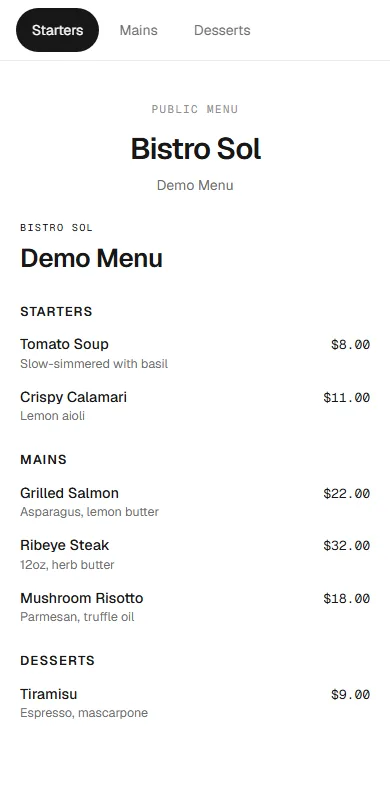
A real MenuLolo demo: scan the card below with your phone camera — it opens the actual live menu. What guests see updates instantly whenever the restaurant edits a dish.

Bistro Sol
Scan for menu
Build your menu with categories, prices and photos — or generate a designed menu with AI in minutes.
One click puts your menu on a permanent link that opens in any phone browser — no app for guests.
Download the QR code as SVG or high-resolution PNG and print it on table cards, stickers or receipts.
Paper menus go out of date the day they're printed — every price change or sold-out dish means a reprint. A digital menu lives online instead: update it once, and every guest sees the new version on their next scan.
MenuLolo turns your published menu into a digital menu that opens on any phone — a permanent link and a QR code, no app or account for guests. Edit dishes in the dashboard and the menu updates instantly.
Keep your printed materials too — the QR code never changes, so table cards keep working as your menu evolves. The digital menu is view-only today: dishes, photos and prices. Online ordering and payment are not part of it yet.
The paper routine on the left, the MenuLolo digital menu on the right.
Reprint menus for every price change
Update once — every scan shows the live menu
Pay for design and printing
Build your menu free, publish when ready
Guests squint at a worn paper menu
Photos, prices and descriptions on their own phone
Sold-out dishes stay printed all week
Hide a dish and it disappears instantly
One published menu, a QR code on the table — guests always see the current version.
Seasonal drinks change weekly. Update the menu in the dashboard and the table cards keep working — the QR code never changes.
Lunch-rush guests browse dishes and prices on their own phones — no waiting for a printed menu to reach the table.
Your menu is viewable in every language you enable, so tourists and regulars read the same up-to-date menu.
Dish photos and descriptions carry the room's quality onto the small screen, kept current from one dashboard.
From publishing your digital menu to printing the QR code — every step is designed for busy restaurants.
Export the QR code as SVG or PNG up to 2048 px — crisp at any print size, from table tents to window decals.
Change prices, dishes or photos anytime. Every scan shows the latest version — no reprints, no wasted cards.
Build and preview your QR menu free. A subscription (Starter or Pro) makes the published menu visible to guests.
Download the QR image and lay out your own table cards with any design tool — you control the look.
“Our specials change every week. Since the menu went digital, nobody reprints anything — the QR code just shows what's on today.”
“Guests scan and instantly see photos and prices on their own phone. The printed menu stays, but most tables just use the code.”
“Built the whole menu in an afternoon with the AI tools. Publishing it to our tables took one subscription — and the QR code hasn't changed since.”
Yes. You can cancel anytime from billing settings and your plan keeps working until the end of the current period.
Adding more menus or dishes is blocked with an upgrade prompt. Your existing content stays untouched — nothing is deleted.
Yes. Any paid plan (Starter or Pro) removes the watermark from your public menu page.
Each plan includes monthly credits — Free 100, Starter 1,000, Pro 5,000. One AI enhancement uses 10 credits. Credits reset on the first day of each month (UTC); unused monthly credits don't carry over, top-up credits never expire.
USD, EUR, GBP, CAD and AUD. Currency is set per restaurant and only affects how prices are displayed.
You can cancel anytime; the current billing period is not refunded. EU consumers have a statutory 14-day right of withdrawal for online purchases, including its waiver rules — see our Terms for details.
No. The QR code points to your menu's permanent link — it keeps working for as long as your subscription is active and the menu is published, even after you edit the menu.
Your live menu — dishes, photos, prices and daily specials. MenuLolo's QR code menu for restaurants updates instantly on every edit, so guests always see the current version.
No. Any phone camera scans the QR code and opens your menu in the browser — no app download, no account, no waiting.
Download the QR code as print-ready SVG (vector, ideal for A4 table cards) or high-resolution PNG in 1024 and 2048 px — H error correction and a built-in quiet zone keep every scan reliable.
Not yet. The digital menu is view-only for now — guests see your live menu with dishes, photos and prices on their phones. Online ordering and payment are not part of MenuLolo today.